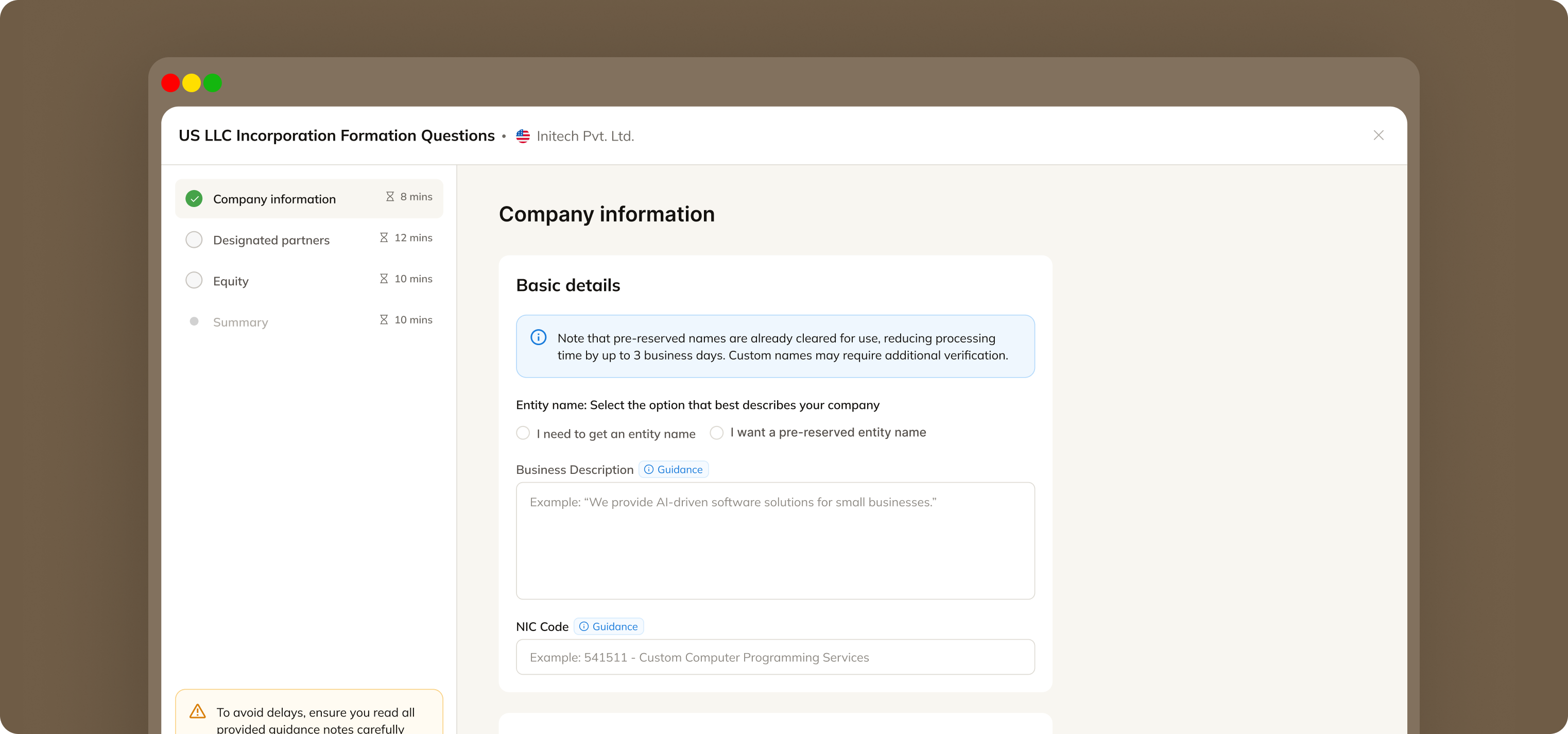
Overview
Context
Forms are an integral part of the Commenda's product. All the services, filings and workflows need to collect information in various capacities from the user. Almost every flow has a form input in it.
Data collection being the backbone of the product, needs to be efficient, cohesive and delightful for the user.
Target users for Agent App
These people primarily use the Commenda's enterprise app to look at their ongoing services and provide data if needed for any service/filing/workflow.
They provide us information about their entities, which in most cases is quite a long massive multi-step form to complete.
Contributions
Led design from concept to ship
setting the direction, producing the work, and driving the team toward measurable outcomes.
Partnered cross-functionally
with UX research to assist in uncovering key user pain points.
Worked closely with stakeholders
to refine product strategy, balancing user needs with business goals.
Problem
We identified that forms are a major point of friction for our users. Most forms in any filing/service is a multi-step form and it might take them days to submit it.
These metrics showed us that users were quite uncertain and anxious while filling forms and this lead to them dropping off to confirm information.
Hypothesis and research
I read and researched about how other products handle user-drop offs during data collection. And it turns out, most of it can be solved just by providing enough context and over-communicating with the user. This helps them skip the search and have everything they need to do the task.
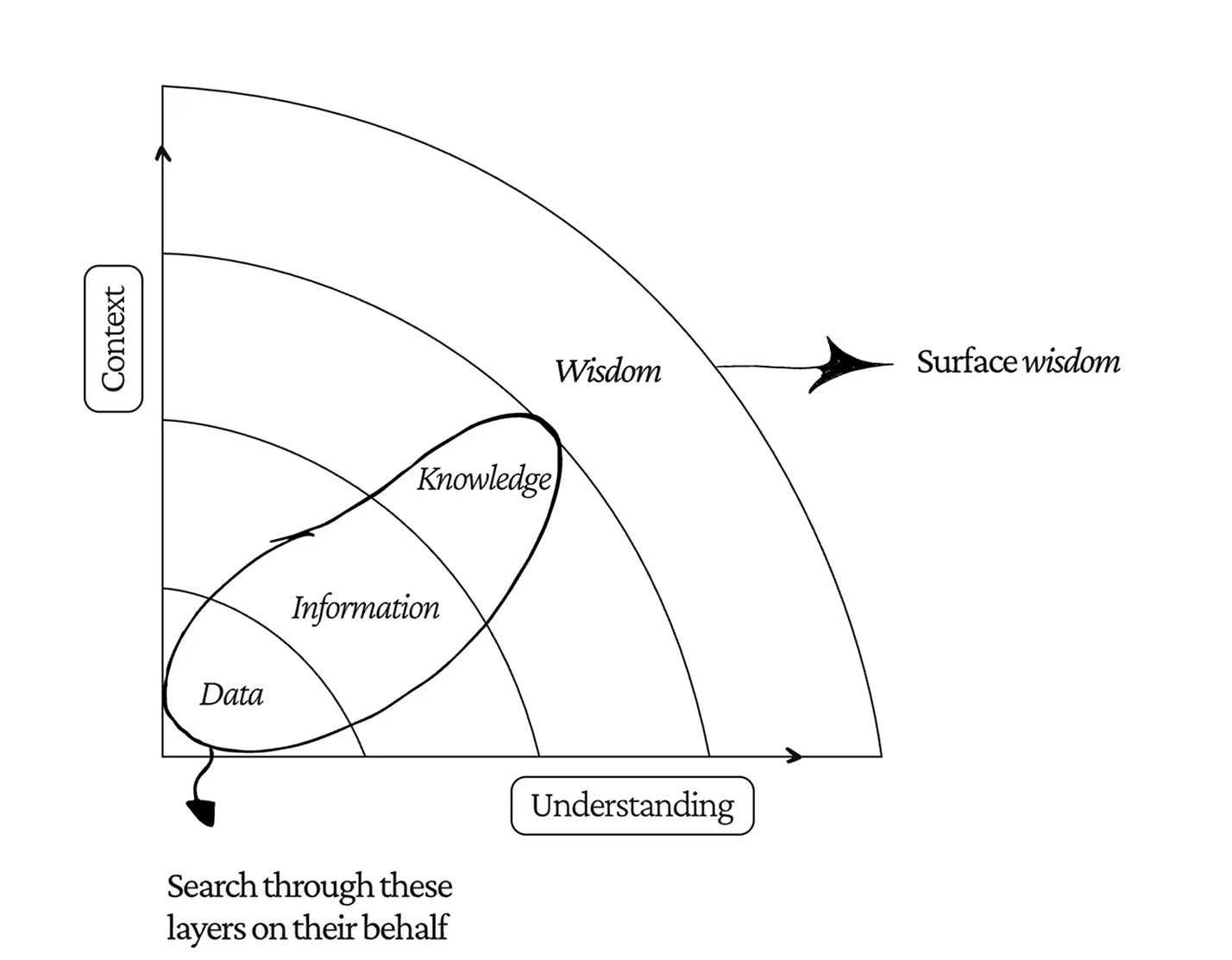
Source: AI at Amazon by Bradley Ziffer
Most problems are search problems. If we make data ready-to-consume and easily digestible, the user experience automatically improves.
The other thing that I learned was data presentation. The way your product presents data says a lot about the product. We usually have a lot of data which can be useful to the user. We just need to be very prompt and keep an eye open for how can we make it accessible to the user in the right way so that the ser actually finds it useful.
Solution
We introduced a modular form system built around reusable components. The core idea was to break forms into independent, composable modules that can be reused across workflows.
I will now briefly go over the architecture of the new system that we formulated approaching the problem from first principles.
1. Form modules (the base layer)
The system I created for scalable form modules was simple: there will be a base form block component as the container. This container will have different variants for the form.
This will help us scaling the forms in future workflows and services.
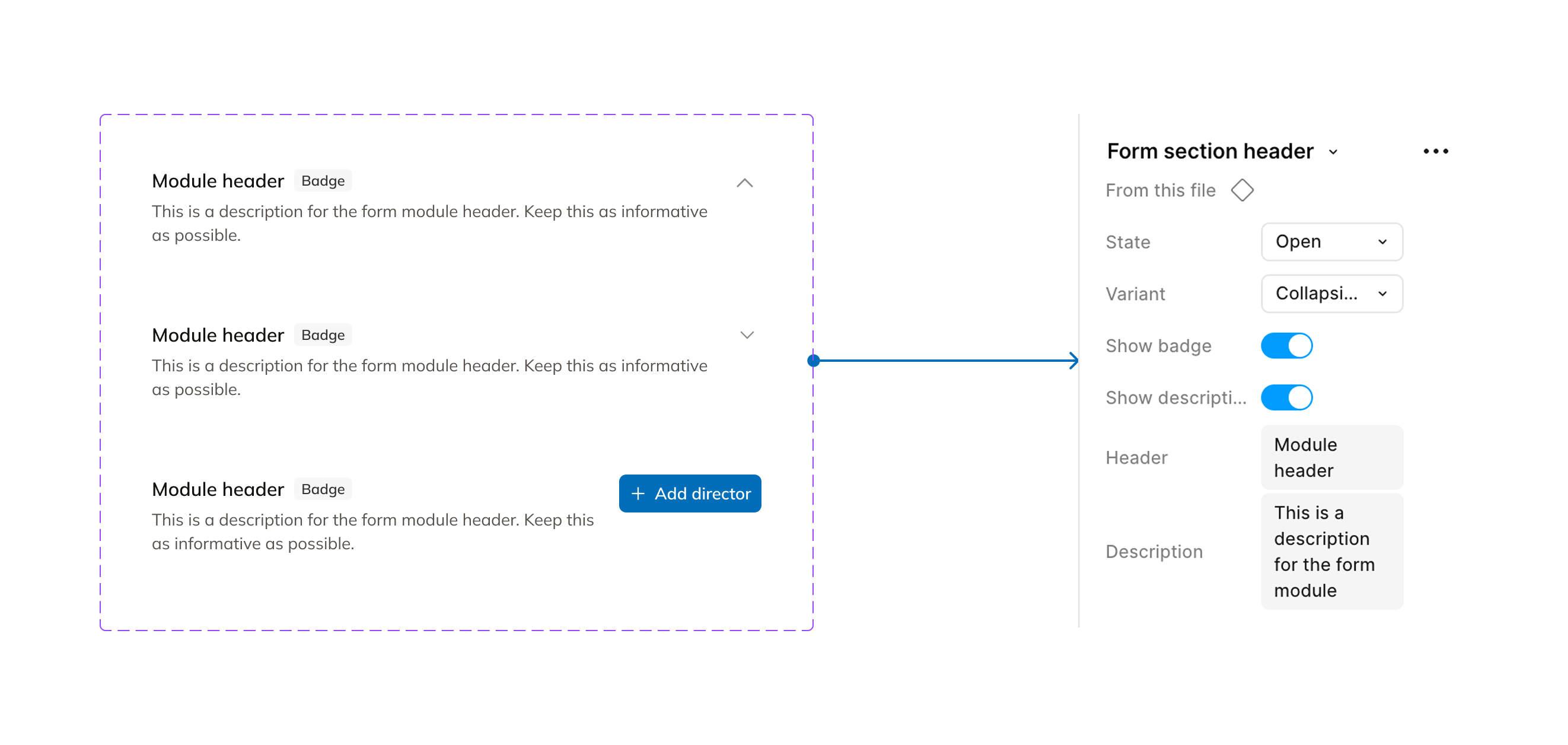
2. Form composition layer
Commenda has its own form builder to create and use forms. Even though it is quite scalable to create and ship forms without any engineering help, but creating forms from scratch every time is a tedious task for the ops team.
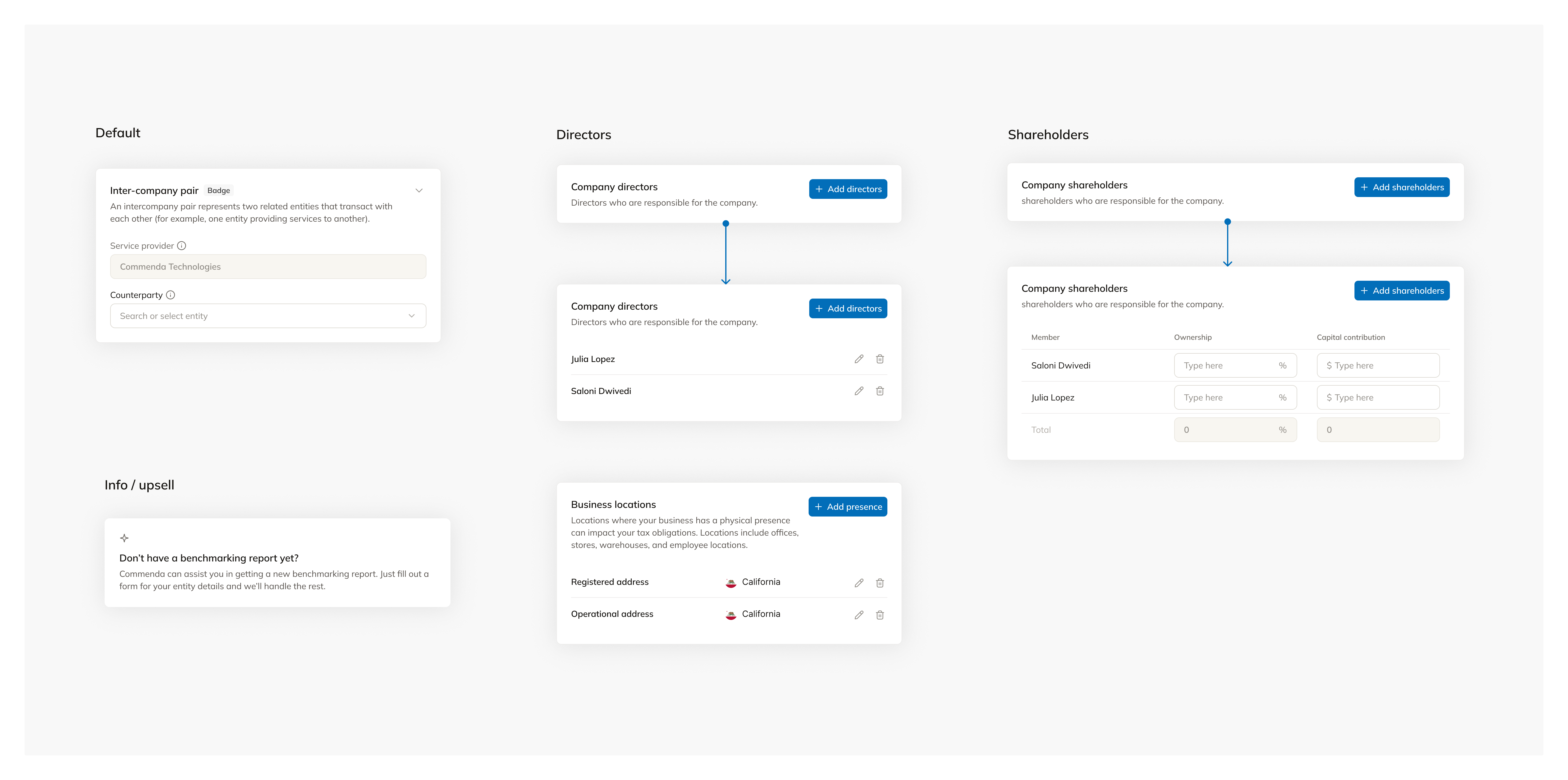
I identified common data patterns and converted them into reusable modules, for example:
- Company Information
- Directors / Shareholders
- Registered Address
- Tax Identifiers
- Financial Details etc.
For data integration, Commenda has a data layer called CommendaOS. CommendaOS ensures that every user's data is stored centrally at one place so that finding relevant information is easy and users don't have to enter the same information again and again at different places.
Now these pre built modules were directly integrated with CommendaOS which made it easier to store data making these modules truly reusable.
And then, we hit a recursion problem
Most of our forms had one thing in common: Nested Forms.
This meant that we needed similar kind of repeated information, for example, filling a spreadsheet with employee information; the type of information (columns) remain constant, you just keep adding more rows to it with different details about each employee.
This was a constant problem to us because in forms like incorporation, users needed to add director/shareholder information. There can be multiple directors and shareholders to an entity.
Then on top of that, there can be two different types of shareholders: individual & corporate. In some cases, information about corporate shareholder of a corporate shareholder or individual shareholder of a corporate shareholder is also needed.
We introduced bottom sheets instead of modals. Bottom sheets ensured that there is enough space to accommodate variable sizes of nested forms. The bottom sheet form will behave the same as the original full page form. It will replicate the same UI in case of steps.
3. Experience layer (addressing the user pain points)
After we had set up a strong and scalable foundation for creating and shipping forms, I started thinking about how to make the experience better for the users' pain points.
And i realized, a lot of it can just be solved through better copy, right content and guidance to the users at right places. So, I went ahead to talk to the ops team and CSMs to identify the major hotspots where users are usually stuck.
I also spent some time watching mixpanel sessions of users filling forms in various kinds of services/workflows.
This helped me gather some metrics like:
- Surface areas with high error rates
- Step-wise drop-off rate
- Save & resume rate; % of users who leave and come back
These metrics were generally high for incorporation forms, sales tax onboarding steps and transfer pricing onboarding steps.
I introduced the guidance badges to contain all the information about a certain input and why it is needed.
We first tried using info/help icons in place of the badges and after talking to a few users we realized, users usually skip those as they think it might not be helpful.
Catering to the upsell opportunities
There was a huge gap in the upsell space in our product. There were so many services that Commenda offered but the users weren't aware. They ended up buying those either outside the product or reaching out to the support separately to ask about this.
Due to this, we ended up losing a lot of opportunities to provide a product suite experience to our existing customers. I catered to this but thoughtfully placing upsell cards wherever required.
Making the users prepared
For longer forms with multiple steps in it, usually users take time to fill it because they are not prepared. We decided to have a step 0 for the pre-requisites. This would inform the users about what type of information will be asked in this form and how they can be prepared beforehand with the information/documents.
Impact
Reduction in missed deadlines due to better prioritization and visibility.
Faster task initiation using SLA dashboard + focused task views.
Average workflow completion took ~14–16 days. Reduced to ~10–12 days
Learnings
Designing for scalability
Working on the whole form filling experience and making a strong foundation for more scalability was a great learning curve for me. I got to know so many nuances and details about how scalable systems are created, deriving so many concepts from OOPS(Object Oriented Programming) to lay the foundation, understanding user's behavior and their thought process.
Standardization needs flexibility
A fully standardized form system would have limited product growth. The real challenge was creating reusable modules that could still adapt to different jurisdictions, services, and business requirements through configuration rather than custom builds.
Data is a shared product asset
The same information was being collected across multiple workflows in different ways. Treating data collection as a shared product capability improved consistency, reduced duplication, and enabled a more cohesive user experience across Commenda.